FIFA World Cup 2026™ is basically the official mobile sidekick, developed and published by FIFA, for that big 2026 tournament, and yeah it is the first ever World Cup co-hosted by three nations, the United States, Canada and Mexico. You can grab it on iOS as well as Android, and it gets positioned as the one place fans will go, whether they are sitting in a stadium or well, watching on the other side of the globe.
In the middle of it, the app feeds you live scores, match fixtures, schedules, player stats, line-ups, plus real-time updates, all official and kind of gathered together in one spot. The whole interface feels built around matchday vibes, with a personalised feed that sort of lifts content based on what teams and competitions you follow, and it tries to keep up with what matters now.
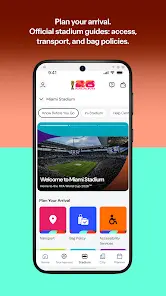
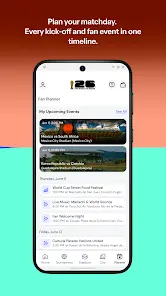
One of the headline bits is the Fan Planner, which is a calendar style tool where you can organise city activities and stadium logistics during the whole tournament, so by the time kick-off shows up , you can just focus on the football. That pairs with location based content that shifts depending on if you are travelling toward a venue, already inside the city, or actually at the stadium. There are 3D stadium maps too, and you can pull up the important matchday information before kick-off, like it knows you are about to arrive.
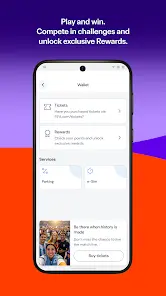
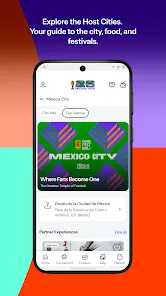
Beyond just tracking games, there is also an interactive layer that feels, well, kind of fun. Users can join FIFA World Cup 2026™ fantasy football, a Bracket Challenge, and a Predictor game, while earning FIFA Rewards points, and unlocking offers over the tournament. And the app is sort of also an exploring tool, so fans can check Fan Festivals, local events, restaurants and attractions across all 16 host cities, personalised to your location and where your travel plans are pointing.
Critically, match tickets are delivered exclusively as mobile tickets inside this app, so it is not only a tournament companion, it is also a stadium access instrument, and that means the initial setup well before matchday is kind of essential.


FIFA World Cup 2026™ has, in general, been mediocre on the Google Play Store, getting a 3.1 rating with more than 1 million downloads. Still, iOS is worse, because the iOS App Store rating lands at 1.7, mostly due to the low number of reviews.
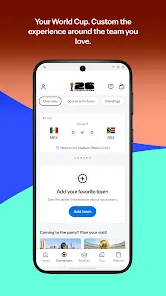
FIFA World Cup 2026™ was updated to improve the personalised feed and navigation feel.
After longer use across the tournament opening phase, FIFA World Cup 2026™ looks like a genuinely ambitious product but it does not always manage to live up to what it promises in real life.
The live match centre is where it really shines, because scores, line-ups, and key events update promptly, and the bracket display for the knockout rounds is both neat and easy to read. The Fan Planner and host-city guides also bring real value for travelling supporters, offering itinerary style tools that go beyond what a normal sports app would do.
That said, performance inconsistency keeps showing up. A number of users say the app can be slow loading content, with some screens that take way too long to respond. Account handling is another weak spot. Some fans reported repeated email verification loops, and even unintended tweaks to their profile details.
Navigation within the Play Zone feels a bit annoying too, because there is no obvious back button when you move between mini-games, so people end up closing the section and reopening it. The ticket integration is fine in theory, but it needs a separate standalone tickets app, which sort of breaks the all-in-one experience FIFA sells. So overall, it is essential, but also imperfect.
Pros
1. Live scores and real-time match stats update quickly and reliably.
2. Fan Planner helps tourists plan full trip logistics.
3. 3D stadium maps + location aware content feel truly inventive.
4. Fantasy football plus Predictor games add engaging interaction.
5. Official FIFA source supports data accuracy and exclusive tournament material.
Cons
1. App loads slow, which frustrates users during high traffic match moments.
2. Account verification issues can log users out unexpectedly, again and again.
3. Tickets are handled in a separate app, weakening the all-in-one promise.
4. Play Zone has no back button, making in-app navigation feel jumpy.
5. Personalised feed might miss important updates from teams you follow, favourite or not.




















 Clean
Clean
 Warning
 Blocked



 Check All Versions